
When "No Error" Is the Error
We set out to build a solution using OpenFlow and Cortex Code (CoCo). A straightforward implementation quickly turned into a lesson in troubleshooting failure modes that produced no obvious errors , only undesirables outcomes. This blog takes you through the error, the fix and more importantly the take aways from those error resolution.
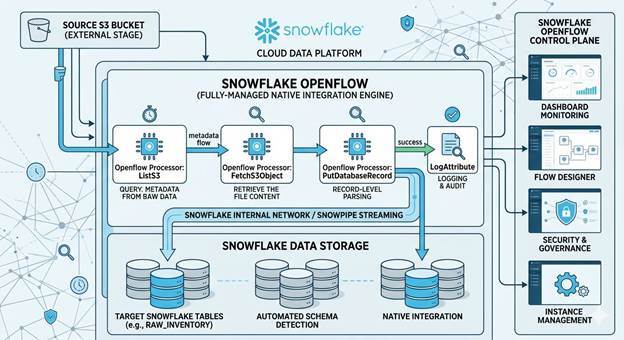
Openflow Pipeline to load S3 data to Snowflake
CoCo recommended to use Openflow processors ListS3, FetchS3Object , PutDatabaseRecord and on success LogAttribute.S3 is the source and Snowflake managed tables as the target.
What went wrong
Pipeline design and implementation took couple of minutes once S3 bucket was provisioned, IAM role permission was established( perceived privileges/permissions). Some of the failures encountered were fixed with help from CoCo and some with engineering intuition.
|
# |
Issue |
Symptom/Error Message |
Error Resolution |
|
1 |
DNS Resolution |
Can't reach S3 server |
Create Network Rule + External Access Integration |
|
2 |
Bucket Format |
Connection failure |
Use bucket name only; folder path in separate Prefix field |
|
3 |
Empty Key |
Key cannot be empty |
Use ${filename} not $filename — curly braces required |
|
4 |
Silent Loop |
Data processing but nothing reaching destination, zero errors |
Uncheck "retry" on success in Relationships tab |
|
5 |
No Re-listing |
Works once then stops |
Set Listing Strategy to "No Tracking" |
|
6 |
Stale Filename |
Fetch fails after rename |
Clear all queues, restart file-discovery processor first |
|
7 |
Silent Sink |
Final processor = 0 bytes |
Switch to PutDatabaseRecord; ensure CSV parser is enabled |
The Hardest Lesson: The Silent Retry Loop
What caused it? The "retry" checkbox on the success path was enabled. In Openflow, each processor has a Relationships tab controlling where data goes next. With retry on success, every fetched file looped back infinitely never reaching Snowflake. No error, because nothing technically failed.
Troubleshooting: Checked warning notifications (bulletins) and logs revealed nothing. Added error-capturing components but nothing arrived. The breakthrough came from engineering intuition: the processor was writing data but producing zero output downstream. That narrowed it to the Relationships tab.
How it got resolved: Opened Relationships tab → found "retry" checked on success → unchecked it. 631KB immediately flowed into Snowflake. Confirmed via Apache NiFi documentation as OpenFlow’s own docs currently lack coverage of this pattern.
Improvement required: OpenFlow should document this failure mode and consider preventing retry-on-success by default.
Where CoCo Helped And Where It Couldn't
CoCo's strengths: Generated SQL for network rules instantly. Identified the ${filename} syntax fix from a misleading error message. Provided correct fixes for bucket format, file tracking, and queue management.
CoCo's limitations:
-
Cannot create pipelines — CoCo can suggest flows and execute SQL in Snowflake, but cannot interact with Openflow's visual canvas. You must build it yourself.
-
Cannot diagnose silent failures — no error message means no signal for AI to work with. The retry checkbox state isn't exposed via SQL, API, or logs.
-
Reactive, not proactive — when asked to build an S3 pipeline, CoCo provided processor config but didn't mention prerequisites (network rules, runtime roles, EAI). Surfacing these upfront would eliminate the DNS issue entirely.
What Is of Value with OpenFlow
Despite the issues, every problem was diagnosable from the visual canvas without code or external tools:
-
Real-time visibility — watch data counters update live
-
One-click inspection — right-click any connection to view queued data
-
Drag-and-drop observability — add error logging by connecting components
-
Native Snowflake security — authentication and logs all within Snowflake
Three rules that prevent silent failures:CoCo recommended
1. Always verify the Relationships tab (data routing) — not just Properties
2. Always enable shared services (like CSV parsers) — configured ≠ active
3. Always connect failure paths — unconnected failures silently drop data forever
Once these learnings are internalized, Openflow is the fastest path from S3 to Snowflake.
Frequently Asked Questions (FAQs)
Yes. Openflow runtimes have no outbound access by default. Each external endpoint (S3, GitHub, APIs) requires a Network Rule added to your External Access Integration.
In the Controller Settings panel, enabled services show a green lightning bolt icon. A configured-but-disabled service will silently cause your pipeline to produce zero output with no error.
Yes, but PutSnowpipeStreaming is better suited for high-throughput streaming (>1GB). For moderate batch files and easier debugging, PutDatabaseRecord is recommended.
After configuring any processor, always open the Relationships tab and verify that "retry" is unchecked on the success path. Only enable retry on failure paths where you want automatic retries on transient errors.
Query your Openflow event table in Snowflake. All processor activity, warnings, and errors are logged there — even when nothing appears on the canvas bulletins.